
IPTV for Firestick UK - Stream Live TV in HD & 4K
Looking for the best IPTV for Firestick UK setup in 2026? You’re in the right place. Our service works with all Amazon Fire TV Stick models.
Get instant access to thousands of live channels. Enjoy on-demand content and live sports. Watch in Full HD and 4K quality.
No tech know-how required. No wiring. No long-term agreements. Simply plug it in, set it up, and start streaming.

Why Firestick Is the Best Device for IPTV in the UK
The Amazon Fire TV Stick is the most popular streaming device in UK households – and for good reason. When you pair it with a reliable IPTV for Firestick UK subscription, it becomes a full home entertainment system. It costs much less than traditional TV packages.
Here is why thousands of UK viewers choose Firestick for IPTV:
Affordable and widely available – no expensive hardware required
Easy to set up – ready to stream in under 10 minutes
Supports all major IPTV apps – including IPTV Smarters Pro and TiviMate
4K HDR streaming – on Fire TV Stick 4K and 4K Max models
Portable – take it anywhere and plug into any HDMI TV
Regular updates – Fire OS keeps performance optimised automatically
Which Firestick Model Works Best for IPTV?
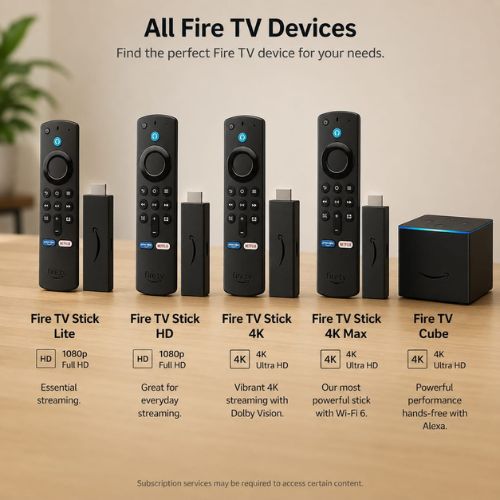
All Amazon Fire TV Stick models are compatible with our IPTV for Firestick UK service.
- Fire TV Stick Lite
- Fire TV Stick 4K
- Fire TV Stick 4k Max
- Fire TV Cube
Our recommendation: Choose the Fire TV Stick 4K Max
It is the best option for smooth, buffer-free IPTV on Firestick in the UK. It works great for live sports and 4K content.
How to Set Up IPTV on Firestick UK - Step by Step
Setting up IPTV for Firestick UK is straightforward. Most users are fully set up and watching within 10 minutes
Step 1 – Enable Apps from Unknown Sources
Go to Settings → My Fire TV → Developer Options and turn on Install Unknown Apps
Step 2 – Install the Downloader App
Open the Amazon App Store, search for Downloader, and install the free orange app
Step 3 – Install Your IPTV Player
Open Downloader and enter the URL for your preferred IPTV player app (IPTV Smarters Pro or TiviMate or ibo player or more). Follow the on-screen instructions to complete installation.
Step 4 – Enter Your Subscription Details
Open your IPTV player and log in using the Xtream Codes or M3U URL credentials sent to your email after purchase
Step 5 – Start Watching
Your full channel, sports, and on-demand library will load automatically. Browse, search, and enjoy
What Is Included With Our IPTV for Firestick UK Subscription?
When you subscribe to our IPTV for Firestick UK service, you get:
Worldwide Channels
Watch premium entertainment from the UK, USA, Canada, Germany, and many more countries with smooth streaming on all your compatible devices.
Crystal Clear Quality
Watch your favorite content in HD and 4K with smooth playback and minimal buffering
Always Up Date
Enjoy frequent content updates to keep your viewing experience fresh every day
Troubleshooting - Common IPTV Firestick Issues
Problem
- Buffering or freezing
- App not loading
- Channels not showing
- Poor picture quality
- App crashes
Solution
- Check internet speed – minimum 25 Mbps for 4K. Use ethernet adapter if possible
- Restart Firestick and relaunch the IPTV player app
- Re-enter your subscription credentials or contact support
- Check your broadband speed and switch to a wired connection
- Clear the app cache in Settings → Applications
Average UK broadband speeds are well above the minimum required for smooth HD and 4K IPTV streaming. Most buffering issues are caused by local Wi-Fi conditions rather than the service itself.
Ready to Start? Try It Free First
Not ready to commit? Test our IPTV for Firestick UK service with a free trial before you buy.
Check the channel quality, stream stability, and speed on your own Firestick – completely risk-free.
Frequently Asked Questions
IPTV for Firestick UK
Is IPTV Compatible with Firestick?
Yes. IPTV services can be used on Firestick and other compatible streaming devices. Setup is quick, allowing you to enjoy live TV, movies, and entertainment with a stable internet connection.
What Internet Speed Is Recommended for IPTV?
For the best streaming experience, we recommend at least 10 Mbps for HD content and 25 Mbps or higher for smooth 4K playback with minimal buffering.
Can I Try the Service Before Purchasing?
Yes. We offer a free trial so you can test compatibility, streaming quality, and overall performance before choosing a subscription plan.